Category Archives: Web/Internet

Signing Up with the “Parasites”

So we’ve finally gone and done it, we’ve signed up with an agent to put our house on the market. It’s almost exactly three years since we pulled out of our last experience with the joys of the property market, so hopefully this time around will be less frustrating. We’ve had one hiccup so far which is that our local solicitor who spotted the issue over the parking at the Bewley Homes development last time has now retired so we’re scouting around for a new solicitor, however at this point we’ve been running the gauntlet of the local estate agents.

Talking to those who have moved recently we haven’t come across any ringing endorsements of any of the local agents, most people seem to regard dealing with them as a necessary evil. So we’re starting from a pretty blank sheet of paper.

My thoughts coming to selling the house have been that online exposure is paramount, so any local agent that is not putting properties on both the major property portals – Rightmove and Zoopla – is instantly off the list. Rightmove is the bigger of the two portals, however I’ve always much preferred the Zoopla site, in particular the level of detail you can get on a potential property, and the area.

I’ve also been taking a look at how each of the agents promote the houses on their books. So do they get the basic facts right? I can show you several examples of local agents who can’t get the basic information on Rightmove correct which means the properties they’re selling get categorised in the wrong place – four bedroom properties listed as three bedroom for example. Next what are the pictures of the property like – are they good pictures or do they look like quick snaps somebody has taken on their phone? Another local agent pads their adverts out with a whole load of pictures of the local area rather than the property they’re supposed to be selling. Also what is the floor plan like? There is quite some variation amongst the agents with pretty good quality plans from some, whilst another local agent has a number of properties where the measurements don’t add up and there are rooms with doors missing altogether, for example a bedroom that has no door at all, just walls. Then finally there is the wording on the advert, does it tell you about the property? Some agents do a traditional room by room tour, others a straightforward bullet point list, whilst another you get a little essay that doesn’t really tell you that much about the house. Even then are there basic factual errors in the text – I can show you several examples of local agents who get basic local details wrong, stating the house is in a different estate from where it actually is being a big one I’ve seen before.

Having gone through all of those we’ve had a couple of local agents out to value the house with a view to putting it on the market. Both valuations were around the same sort of ballpark, and both agents seem to be offering a similar service and both of them were looking to charge around the same sort of percentage commission which would work out as about £4000 to sell the house. The contracts are littered with the usual lock-ins, and clauses that result in the agents getting paid their commission if you trade your house in for a new build property as we’ve looked to doing before, plus the usual sole agent stuff.

However do you really need to spend £4000 to sell a house, or is the money partly going to pay for flashy cars painted in the estate agents colours, or a chain of high street offices that in some cases look like wine bars? Given that the primary way of looking for property these days seems to be online, do you really need to be funding a chain of high street offices anyway? I’ve been aware of eMoov, the biggest of the online estate agents for a while. They have a few houses up for sale locally, and I’ve actually had online chats with them on Twitter several times over the past few years. There was a good introduction to the company and how it was founded published last year in the Telegraph. More recently they have also done a more general overview of the online options, complete with a video with a traditional and an online estate agent discussing the relative merits of the two routes. The bottom line though is that the cheapest package eMoov offer is ten times less than the local agents were proposing to charge – is what they are offering seriously worth ten times more than going online, or is this another industry where online is shaking things up?

I did a bit more digging and there really isn’t any tangible evidence that the local agents can justify a tenfold price difference. Certainly with some of the online options you’re paying in advance, but if you’re serious about selling that doesn’t matter. If you’re not a serious seller then eMoov have a traditional pricing option too, but even that is a quarter of what the local agents were proposing. Indeed if you look at how the traditional estate agents are reacting, they’re basically name calling – in this article they refer to the online agents as parasites. They also seem to be reacting by setting up a protectionist market, as of the end of January they are launching their own property portal which has banned the online agents from posting, banned their own members from promoting on both Rightmove and Zoopla (participating agents have to pick one), and are encouraging their members to only post to the new portal first, holding back posting the new instructions to the better known portals like Rightmove and Zoopla. Essentially unable to compete with the online options they are trying to close them out of the market and giving their customers a worse service in the process.

Where does that leave us then? I have to say I was always leaning towards selling online – I bank online, buy groceries online, do pretty well everything else online, and I can find no overwhelming evidence that the local agents are doing anything to justify charging ten times as much as their online competition. The real clincher though was that the local agents are resorting to setting up a protectionist market and calling the online sellers “parasites” rather than stepping up and actually competing, so last night we set the process in motion, and had confirmation via e-mail first thing this morning. I’ll post more as we work through the process.
UK Wide Public Transport – What About Google Maps or Moovit?

When I published my post about whether anyone could bring the level of flair Citymapper has shown in London to UK wide travel I not surprisingly got some comments back about services I had missed. To be fair I deliberately didn’t list off all the many public transit apps, as there are absolutely loads out there, however I thought I’d discuss two which came up, Google Maps and Moovit.

If you believe the Daily Mail Google Maps now has real time data for the whole of the UK, unfortunately like a lot of articles that appear in the paper, or on their website that is total rubbish. If you read the actual Google Press Release what the said is this:

We’ve added every single transit route in Great Britain to Google Maps—making it easier to get anywhere from Land’s End to John O’Groats.

They then say that they’ve added real-time information for Vancouver and Chicago, they don’t say anywhere that they have added real-time information for the UK. If you click through to the post by their GB product manager this explains that they’ve taken schedule information from National Express and Traveline so essentially what they’ve added is a much nicer interface to the existing UK wide travel planners. Basically somebody at the Daily Mail can’t actually read a press release properly, and certainly didn’t bother to check the actual site to see what is going on.

Screenshot 2014-07-05 22.19.27Doing what the Daily Mail didn’t bother to do taking a look at Waterloo Station in Google Maps, for the Underground station they list the scheduled times of the trains, which might be a bit of surprise to most travellers on the tube, that there is actually a timetable!

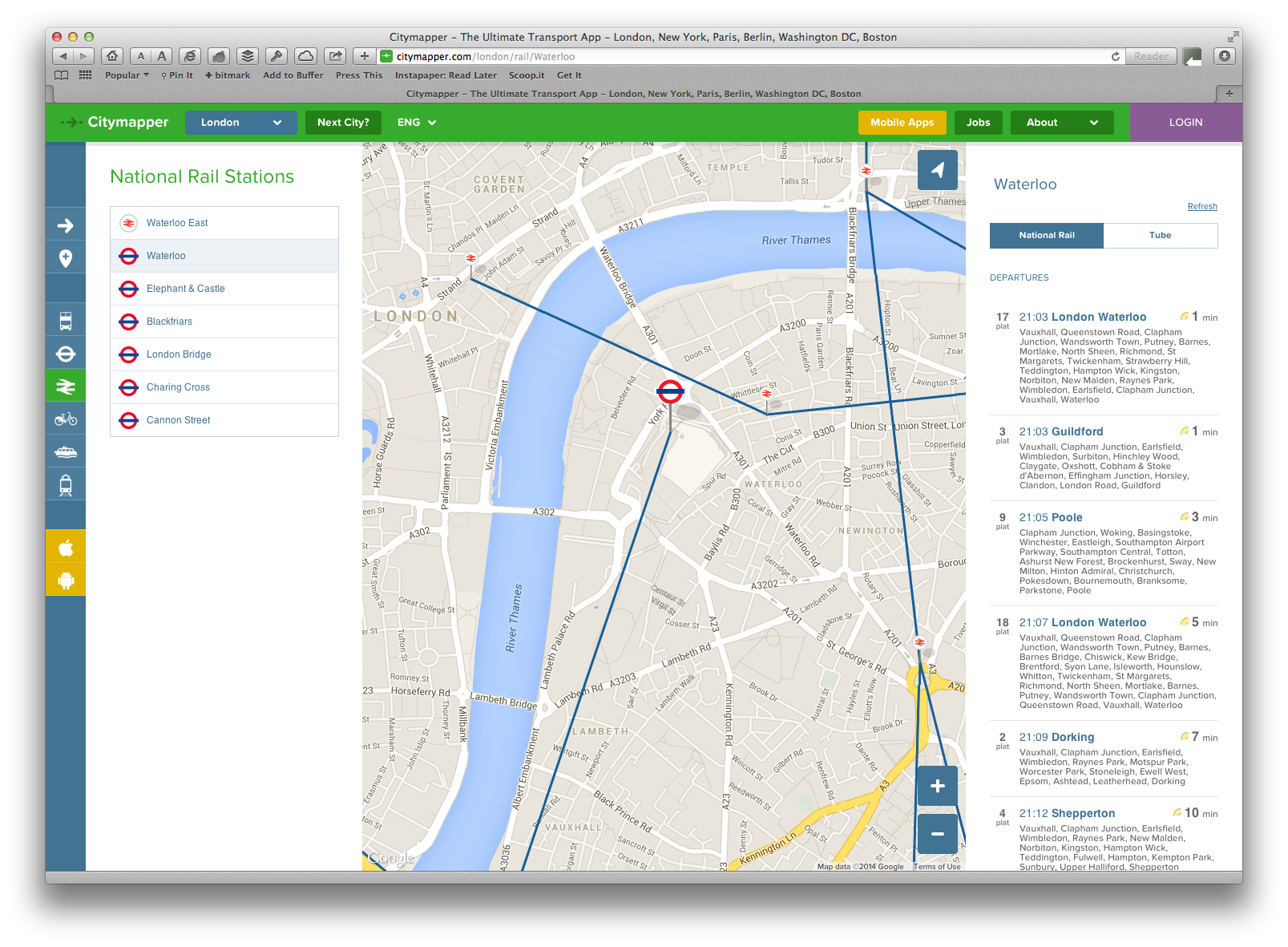
Screenshot 2014-07-05 22.19.00Swapping over to Citymapper we have the actual departures in real-time, as they have for stations all across London.

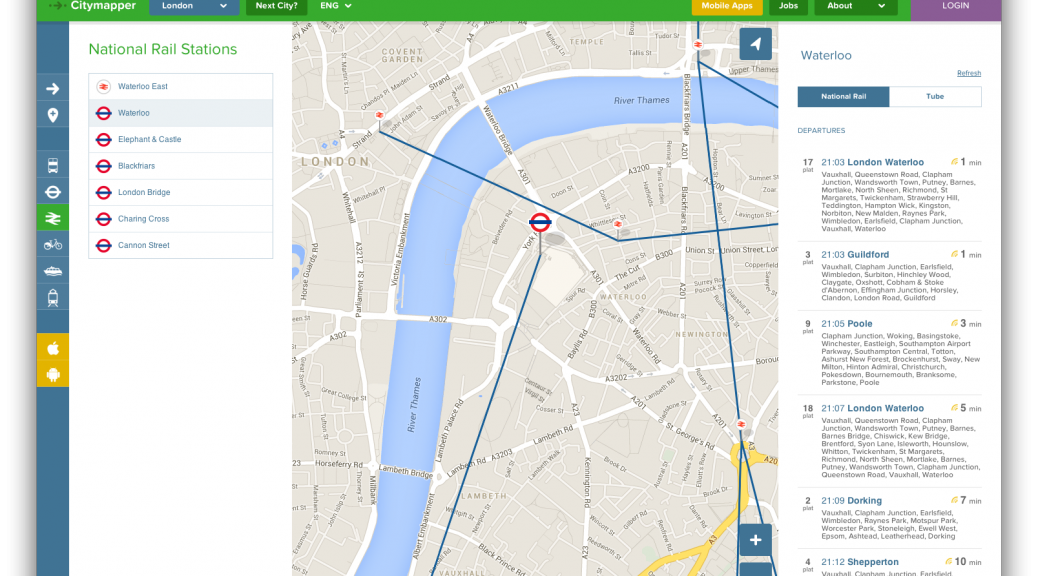
Screenshot 2014-07-05 21.59.45Things are even more sparse when it comes to National Rail – although route planning from Waterloo will bring up accurate times, there are no departures on the Google site.

Screenshot 2014-07-05 21.57.26Taking a look at the same station in Citymapper you get a complete list of realtime departures. Citymapper being London focused has live departures for key commuter routes outside the capital, for example they have departures for Reading station.

The situation is much the same when you look at the smartphone applications – no real-time data on Google, loads within London for Citymapper.

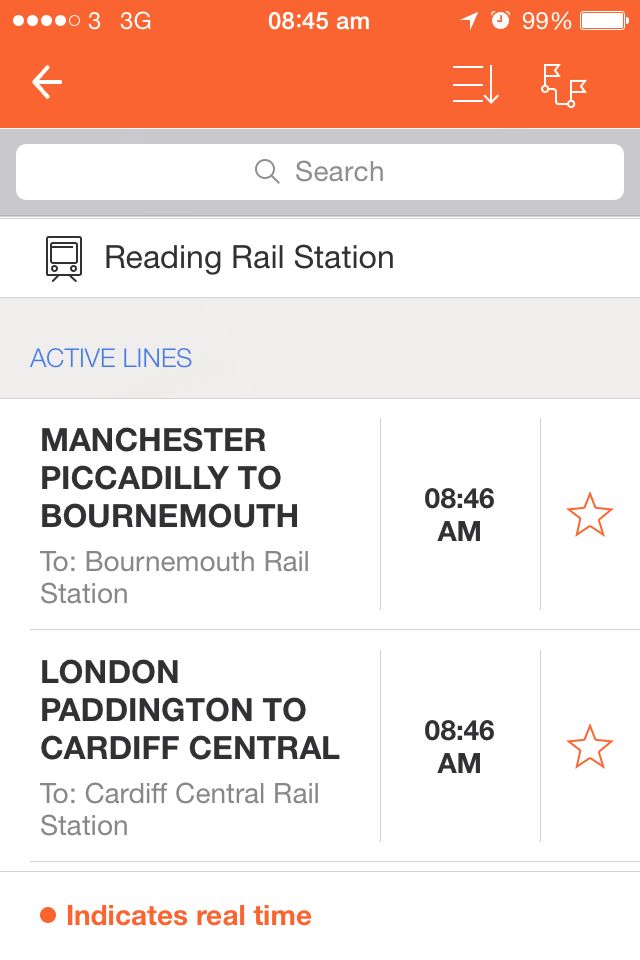
IMG_4133Moving on to Moovit, once again the issue is real-time data. They are a bit better than Google, in that they do have some real-time data, specifically for some buses, but once again they don’t have the real-time data fields for National Rail. Looking at Reading this time, this is an example of what Moovit might show – note the message at the bottom mentioning that real-time departures will be highlighted in Orange.

IMG_4132This iPhone screenshot is from the app of an excellent site called Realtime Trains that is a trainspotters paradise in terms of the , so that app is telling me platform numbers, whether a train is running late, and interestingly has a different departure time than Moovit is presenting.

That also highlights another problem, the quality of the data in Moovit. One of the app store reviews comments that all the bus times on the reviewers local route were ten minutes out. It’s also remarkably difficult to find London Euston station on Moovit – it has Euston Square station and the Underground station, but the only way to actually get to see the scheduled departures from Euston using the app is to find the station on the map and click on it – it doesn’t come up in searches at all. Reading departures can equally be problematic when searching by hand as the app retains the historic split between the old Reading Southern Region station and the Reading Great Western station even though physically they’ve long since become one station. This means that there are two icons for Reading station almost on top of each other and two separate lists of departures.

I have to say, I really want to like Moovit – as an avid user of Waze crowdsourcing public transport data seems a great idea. The developers seem to have come up with a way of tracking journeys that doesn’t decimate your battery level, but without accurate schedules and using all the available real-time data that is available for buses, trains and the Underground it is pretty useless, where Citymapper excels is that it tells me what is actually happening, not what should be happening. There is also a split between Scotland and England which none of the other route planning apps have which makes it impossible to plan a trip that goes over the border – whilst it may be argued that they are splitting by country, the actual underlying data they’re using for the schedules is UK wide resulting in the trains for Scotland apparently only being available on the English area, so it seems a slightly arbitrary split that renders Moovit even more problematic and unnecessarily so.

So my initial conclusion remains, even taking into account Google Maps and Moovit, there is still no UK wide multi-modal public transport application with the flair of Citymapper – who is going to produce one? Will Google introduce real-time data? Will Moovit sort out their schedule data and add in more real-time? Or will Citymapper expand out to cover the whole of the UK?

Can Anyone Bring Citymapper Flair to UK Wide Travel?

Screenshot 2014-06-29 21.38.12I’m a real fan of Citymapper – for travelling around London it does a great job integrating all the trains, buses and the underground together in an easy to use app, a trick they’re repeating in other major cities across the world.

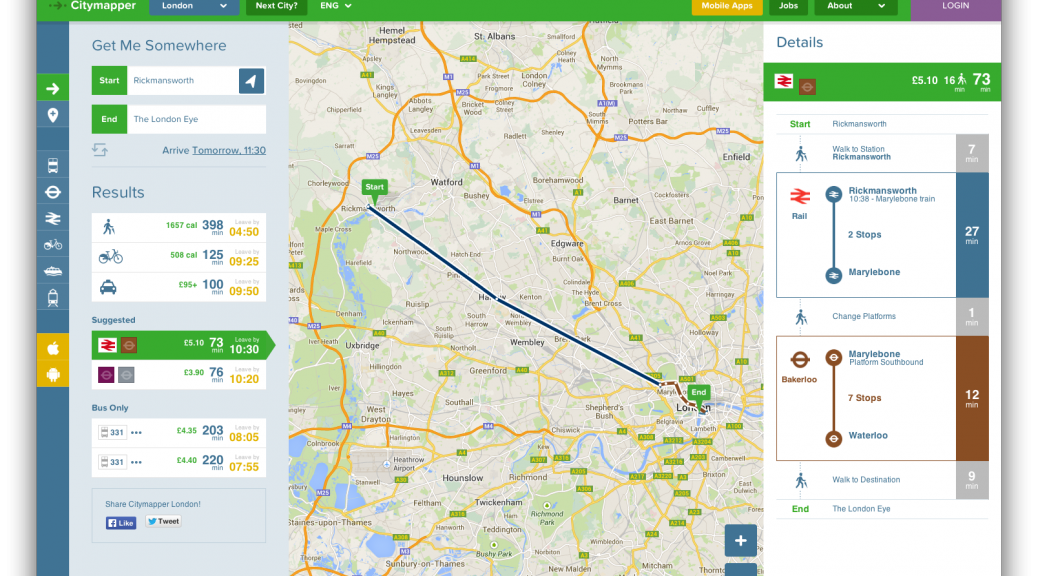
However there is one big issue, whilst I go into London, I don’t live in London, I live out in Berkshire. The app includes train services out as far as Reading, but if I want to take a bus to the station I need a different app like one of the Bus Expert apps to get me to the station. The only buses in Citymapper are those run by Transport for London, so even connections for the outer reaches of the London Underground aren’t included for where I grew up around Rickmansworth.

That’s not to say that there isn’t the real time data around, Citymapper make use of data feeds from Transport API, and their data covers a much wider area than just London, indeed you can find example sites and example applications that use their data on a wider level.

There is also the government backed Traveline websites which have a set of regional travel planning applications, each working and looking different and having been developed by different suppliers appointed by the various regions, and then Transport Direct offer a national route planning service, along with a mobile web site, but no equivalent app. All of the government apps and sites work, but they aren’t exactly the kind of modern web and app experience you get from an app like Citymapper.

Screenshot 2014-06-29 21.36.38One of the better UK wide route planning apps is a cut down version of the Rome2Rio app called UK Transport Search, it’s got a small footprint and is pretty quick to produce reasonable routes, however it lacks any of the realtime information that Citymapper has.

You can certainly plan trips and navigate around the country using a combination of apps, but nobody seems to have produced the kind of multi-modal public transport application that Citymapper have produced for London on a wider scale. We have all the bits, but nobody has actually pulled the whole thing together, so who is actually going to do it?


Can You Trust User Generated Mapping?

A couple of days ago The Next Web ran an interesting and detailed article about the rise of Open Street Map and their ongoing attempt to compete with Google Maps as the go to mapping solution.

Open Street Map data has achieved several notable successes as companies have switched from using Google data to theirs, but the critical question is whether the data is any good?

I have a bit of a love/hate relationship with user generated mapping solutions. As you will see elsewhere on my blog I’m running Open Street Map based maps on my handheld GPS, and my satnav of choice is Waze, which although it doesn’t use Open Street Map, uses maps made in a similar way with user generated mapping.

The strength of both platforms is that anybody can edit the map, so problems get solved a lot quicker than errors in the major suppliers maps get sorted, but that is also their biggest weakness.

IMG_3839I’ll give an example, a couple of weeks ago I was driving to work, and I came across this on the map just south of Eversley, a route I drive most days.

To explain what you’re looking at, the map was showing that the roundabout where the B3272 splits from the A327 was about five times as big as it actually is, and was a residential street rather than a main highway.

Getting home and taking a look on the Waze map editor confirmed there was a problem with the map data.

IMG_3841What you can see on here is the editor view overlaid on a satellite view of the same junction. The roundabout is highlighted in red which indicates that there is missing location data for the road. Checking the road elements the new roundabout had been put in place by a new user who had done little editing before, and who had obviously accidentally damaged the map at that point, messed it up and left it. The problem of course being that nobody else spotted it until it was too late and the update went out to all the users.

To the credit of the community shortly after this screenshot was taken one of the higher level editors sorted the problem as needless to say it got reported fairly quickly, and unlike errors in TomTom or Garmin maps the fix appeared on my copy of Waze within three or four days.

Screen Shot 2014-03-01 at 22.50.53Of course the professional mapping firms don’t get it right. For example this is the dual carriageway that Google Maps has on the B3272 in the middle of Eversley Cross – if you live near Eversley you’ll be forgiven for having missed it previously. What they have now is a bit of an improvement over what they had originally where the westbound carriageway followed the footpath across the front of the houses fronting on to the green.

Screen Shot 2014-03-01 at 22.48.50There is also this long standing problem in Camberley on the TomTom maps. Again it’s been improved over time but it still incorrectly labels Charles Street as New Southern Road, and still has two connections at the northern end of Southern Road that just don’t exist.

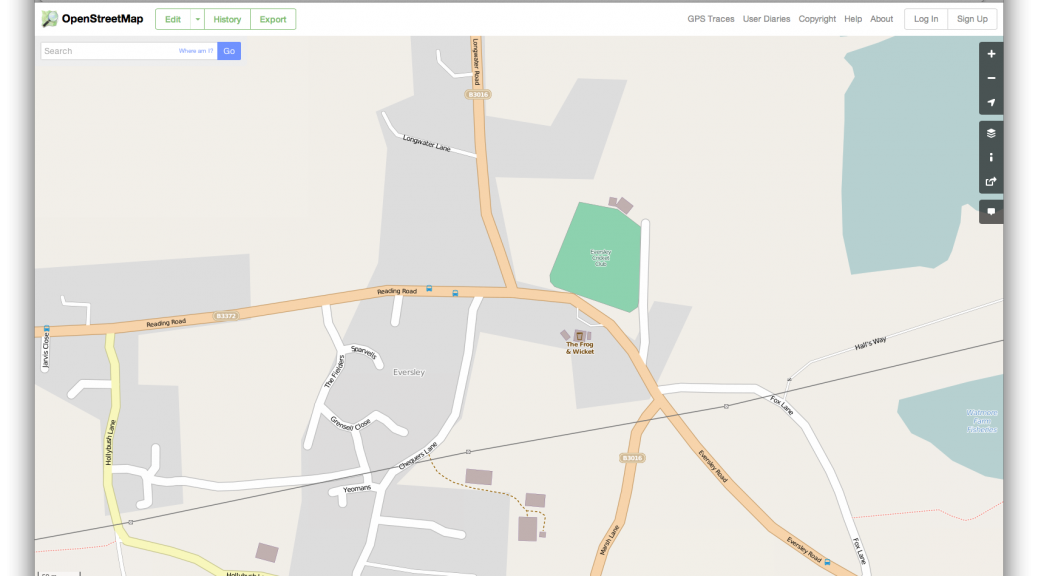
Screenshot 2014-03-01 23.00.26In both of those cases, Waze and OpenStreetMap are right, this is the Eversley Cross dual carriageway on OpenStreetMap.

So can you trust User Generated Mapping?

I’d say that you can trust it to the same extent as “professional” mapping – both have errors and problems and you need to be aware of that and use your common sense using them as you should with any map, even one with the long established reputation of the paper Ordnance Survey maps. The key advantages that user generated mapping can bring is that if there are mistakes they get sorted quickly, and new roads or changed layouts will often appear in Waze or OpenStreetMap long before they turn up in one of the periodic updates for a regular satnav.

Really the comparison of Wikipedia with OpenStreetMap is a good one, both are excellent sources of information, as long as you are aware that they might be wrong…

Is there Life after Everpix for Online Photo Management?

Over the past year or so I’ve been using an online service called Everpix to automatically store every picture taken on all our iOS devices, automatically synchronise pictures from the iPhoto libraries on both our iMac and MacBook, and automatically suck in and keep updated all the pictures I had on a variety of other services such as Flickr, Instagram and Facebook. Having pulled all these pictures in it did a really nice job of detecting duplicate pictures highlighting when the same picture was on multiple sites, and allowed me to browse through all the thousands of digital pictures I’d built up over the years. Daily it would send an e-mail highlighting old pictures taken on that day in previous years. They had a free service that stored only your most recent pictures, but for a reasonable $5 monthly charge they stored unlimited pictures.

However it wasn’t to last – last month Everpix announced their closure, as they weren’t going to be able to pay their hosting bill. If you have a read of this article about the closure in The Verge you can easily understand why – whilst they were paying to host loads of pictures for the free service, not enough of those had converted into paying customers. So I, like other Everpix users started the search for an alternative.

After a bit of a look around it seemed like there were plenty of options. Services like Dropbox and Google+ offer photo storage as part of their offering, and of course there are the specialist photo hosting sites such as Flickr, SmugMug and the rest that can store pictures. There are also services very similar to the Everpix offering such as PictureLife, ThisLife, MyShoebox and Loom with a variety of similar features but various pricing models. The arena is also starting to attract the interest of the big boys, with Adobe having retired their previous online hosting and sharing service in favour of  which is supported by the latest versions of Photoshop and Premier Elements, alongside a suite of other Adobe applications.

First though, if you’re just looking for a secure way to backup your pictures and nothing else, I wouldn’t waste time and money on any of these, just make use of one of the many online backup services and just backup the whole computer. Personally I’ve been using the excellent Backblaze for a while, which has a dead simple per computer pricing model so for $3.96 per computer per month I have a complete copy in the cloud. It operates much like Time Machine on MacOS X, and software like Acronis TrueImage on the PC in that you can set it up and forget about it. It continuously backs up your computer to the cloud, fully automatically and without any need of intervention. Basically the only time you need access it is if you need to restore a file. If backing up your pictures is all you’re worried about, stop reading now and head over to Backblaze! If your house gets hit by lightning and it scrambles all the electronics in your house, as happened to a friend of ours recently, having an off-site backup like Backblaze is worth the small monthly outlay.

Anyway, if you’re still reading, you’re probably looking for something more than just a straight backup.

Looking at all the services I had a bit of a list of important points to consider before spending the large amount of time uploading all my pictures to the service, the main points included (in no particular order):

  • Ease of uploading both from mobile devices and computers
  • Cost of the service – what is the monthly cost going to be now and how much will it go up as the number of pictures grow
  • How does it handle duplicates – this is especially important if you are paying for space as a lousy deduplication algorithm will leave you paying twice for the same picture.
  • Long term service viability – is this a small startup for which this their only product or part of a bigger offering from a large company.
  • Other bells and whistles – are there any additional features that are attractive.

When considering all of this, this is for our combined photo and video library which runs to over 30,000 pictures and videos stretching back over a decade, size wise running to over 250Gb of data.

Starting with Dropbox and Google+ whilst the iOS apps work pretty well sucking every picture off, there is no real desktop integration with iPhoto for example, and both have significant limits – Google+ to 15Gb, whilst Dropbox is limited to 3Gb unless you put down $10 a month to lift that limit to 100Gb. Flickr and SmugMug are possibilities, Flickr especially now it offers 1Tb of space for free, however they are very clearly designed to be used as sites to present your best images, not as general storage for a large photo collection, so in particular neither offer the set up and forget synchronisation with a desktop that Everpix offered. There is also one major concern with Flickr as they have in the past shown a tendency to permanently delete accounts for arbitrary violations of their terms of service, and even when they have admitted they were wrong to do so have been unable to restore  the accounts. If this is going to be a main backup of your photo collection a service that could potentially do that is not particularly attractive!

Looking at the services that are more similar to Everpix, over the past month I’ve had trial accounts with all four, and even paid out for a month to give PictureLife and ThisLife a good workout. The big fly in the ointment for PictureLife, ThisLife and Loom straight off is the price. I don’t for a moment blame them, but for a collection the size of ours the storage cost mounts pretty quickly. This is made worse by the services having duplicate detection that is not nearly so good as their promotion might suggest. A big problem is to do with the way iPhoto deals with exports in that it rarely if ever exports the original image. Even if you load a picture from your iPhone into iPhoto and export it immediately to Flickr, iPhoto will re-encode the picture, so at times I was getting three, even four versions of a picture once edits and other uploads had been taken into account. For any service where you’re paying for space this is an expensive issue!

In terms of features PictureLife, ThisLife and Loom are pretty good. PictureLife will even suck in your albums from iPhoto (although it fails to detect when those albums have been uploaded to Flickr which results in loads of duplicate albums), and ThisLife has a really excellent facial recognition system that once trained does a pretty good job at working out who is in a particular picture. Another really nice unique feature with ThisLife is the joint account feature that allowed us to pull together pictures from all sorts of different sources. Ultimately though with the numbers of pictures we have, the killer with all three of those services is the monthly cost, which is only going to go up. However nice the services are the poor deduplication coupled with the monthly outlay for a non-essential service means they weren’t my long term choice.

I’ve deliberately separated out MyShoebox (not to be confused with Shoebox from Ancestry), because unlike the others it is following a more Everpix like pricing model. The main difference is that rather than limiting the time period that can be uploaded for the free account it degrades the resolution. Like Everpix it’s another startup, this time running out of Toronto. It’s not as feature rich as PictureLife or ThisLife, in particular lacking any of the linking to third party services online, and lacks a bit of the polish of Everpix, however it does what is says on the tin. I was not overly impressed with the desktop synchronisation client which on the Mac seemed to be a wrapper around a web based uploader and certainly wasn’t as nice as other services. It also pops up a really annoying “are you sure you want to exit” type modal dialog whenever you try and close the website. In terms of special features it includes some nice analysis of the pictures through scanning the metadata. Certainly it scores on price, and will be even more attractive if they improve the desktop synchronisation, but with the Everpix experience, is the pricing sustainable?

That brings me onto the big boys offering, . In terms of longevity, Adobe have been in the game for a very long time, so in terms of a secure bet for a company to do business with they seem a good choice. The pricing is also really attractive. For the first month you can upload as much as you want for free, from then on you can remain on a free account, but you are limited to uploading 50 photos a month, alternatively they have a pro plan for $6 or £4 a month which gives you unlimited uploads. There are no costs for storage, Adobe will basically take as much as you can throw at them. You can upgrade online, but they also offer a subscription option on iOS devices through which you could potentially pay just for a month if for example you were going on a big trip, then drop back to the normal service limited to 50 uploads.

Adobe are coming at this from a slightly different angle, essentially Revel is acting as a central repository for all your pictures and videos. The latest version of Elements Organizer that ships with both Photoshop Elements 12 and Premiere Elements 12 has a background agent that will synchronise your entire Elements Catalog into Revel. If you’re not wanting to buy into the whole Elements ecosystem they do a free Revel app for the Mac, iOS devices and Windows 8 which include limited picture editing features alongside upload and synchronisation features. A number of other Adobe apps such as Photoshop Express, Grouppix and Videobite also hook up to Revel. Revel will also pick up on all the metadata associated with pictures although you’ll need to be using Elements as a Revel client to gain access to a lot of that.

Certainly in terms of the offering, I’ve found Revel the most attractive. Although limited, the apps on iOS and Mac are polished and stable. If you are an Elements user on the Mac, one big gotcha is that the Elements Organizer, being cross platform doesn’t talk directly to the Revel application, so you will definitely end up with two copies of your Revel library locally if you have the option turned on in Revel to store pictures locally as Elements will try and download copies of all your pictures into it’s catalog. However with the subscription option means that you won’t be tied to a monthly cost, which if you don’t pay will result in all your pictures being wiped, and Adobe is a big enough company that they’re not going to collapse in a mountain of debt as a startup might.

After all of that, there really isn’t anything yet that compares to Everpix in terms of what it did and the polish, whilst I’m using Revel to store pictures, it lacks a lot of the connectivity that Everpix had – essentially with Revel you’re getting unity by signing up to the Adobe way of doing things, rather than the way Everpix tries to bring it all together. If you want a lot of the Everpix like features to explore your photo collection, and you either have a limited sized photo collection or money isn’t an issue I’d certainly look at PictureLife, ThisLife and Loom, but for any large collection beware of how much it might cost in the long term. Ultimately though if you’re wanting a secure backup of your pictures, get something like Backblaze to keep your data safe, and consider services like this as an added extra, not you only form of backup.