Tag Archives: N770

iPod Touch First Impressions

iPod Touch Web Browsing

So having had an iPod Touch to play with for a couple of days, I thought I’d give my first impressions.

Firstly, being an Apple device, the integration between the iPod Touch and the Mac is great. Effectively all you have to do is plug the iPod Touch into the computer and you can sync music from iTunes and pictures from iPhoto straight down onto the device. Needless to say, in my situation where both databases are much larger than the capacity of the device you need to take some level of manual control, but compared to getting stuff onto the Nokia N770 it’s a lot more straightforward. By way of comparison, putting music onto the Nokia involved a bit of care with file formats – and also remembering that anything protected probably wouldn’t work, putting on pictures you’d have to manually ensure they were the right dimensions – with the iPod that is all automatic.

Once loaded onto the iPod the slick experience continues. You can browse through music either in familiar list form, or alternatively turning the device to a landscape orientation automatically activates cover flow mode where you can flip through albums via their album art. Pictures are similarly presented, again allowing you to flick through the images.

All of the interface operates through a touch-screen – in total the device has only two buttons, the ‘power’ button on the top, and a home button that always takes you back to the main menu. Unlike almost all similar devices there is no stylus – you operate the interface with your finger. Flicking through photographs or songs is all carried out by sliding your finger across the screen. Surprisingly there isn’t too much of a problem with finger marks on the screen either – although the metal casing shows them up, the screen is readable even after quite heavy use of the screen.

The other great feature of the interface is the momentum. When you flick, much as if you push an object in the real world, it carries on moving and slowly decelerates. If you are scrolling down a long list of tracks for example you can also catch the list by touching the screen, which brings the scrolling to an immediate halt. Comparing this to other interfaces where you’re repeatedly pressing an arrow key to scroll down, or that come to an immediate halt, it is much more intuitive, and even though I have over 2000 songs loaded onto it is still relatively quick to locate them.

The momentum in the interface also extends to the built in web browser, which in part goes towards making the iPod Touch far and away the best mobile browsing experience I have come across. The Nokia N770 may have the best screen (well at least until it failed), but the iPod more than makes up for it with the ease with which I can move around a web page and zoom in and out onto content. Hitting links accurately with a finger rather than a stylus takes some work, as does typing on the on-screen keyboard, but it is still streaks ahead of anything else.

Perhaps the only disappointment is the YouTube application. Whilst it does manage to make videos from YouTube look considerably better than they do on the web, it has one major flaw – when it is running it hogs the machine, and if the flow of data from the site stalls, so does the application. It doesn’t actually crash the iPod, but it does render it unresponsive until the data stream settles down again.

Looking at other things you can do with it, one of the big criticisms when compared to the iPhone was the lack of an e-mail application. Whilst you can add mail by copying the app over from an iPhone, you can do it without hacking the device using a site called Mail Coaster. This very simply provides an iPod Touch style web interface to whatever mail server you specify. It’s not the most feature rich application, but for a simple mail check it is fine. Google Reader is also among the sites that now also have an iPod Touch friendly user interface.

By far the most impressive thing about the whole device, especially having used Windows Mobile, Symbian and the Nokia N770 is how rock solid the whole device feels. That’s not to say there aren’t bugs – the aforementioned problem with the YouTube application for a start, and on one occasion it has inexplicably lost the wi-fi connection – but it has yet to properly crash, unlike the multitude of mobile devices I’ve owned from the other stables. It also doesn’t suffer from the annoying and inexplicable pauses that those suffer too, aside from the YouTube problems everything moves along at a nice responsive speed.

It may be being marketed purely as a music player, but alongside this Apple have converged enough with the features of the PDA that they’ve produced a pretty good stand-alone PDA too!
New Toy

iPod Touch

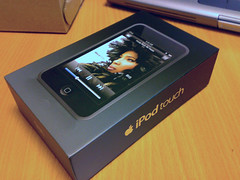
So this morning at work a small package turned up on my desk containing my new toy, an iPod Touch.

Depending on your point of view, this is either the ultimate touch screen and wi-fi equipped iPod or it’s a cut down iPhone with loads of functionality missing. Needless to say I’m thinking of it more in the former category, and thinking that I could use it for all the things that my short lived Nokia N770 – which produced a white screen of death a couple of weeks ago – was doing, so as a general media device with a bit of internet browsing. With the news that Apple are going to open up the platform it certainly seems like an iPod Touch will in the future become a good platform for that sort of thing – and probably a lot easier to sync up with my desktop than the Nokia N770!

As is traditional, I’m just waiting for it to sync large amounts of my music and pictures before I’ll get to play with it – I guess it will be tomorrow before I get a chance to seriously try it out!

N770 – Nice Tablet – Lousy Quality

Faulty Nokia N770

A month or two ago I was raving about the Nokia N770. Unfortunately tonight I am somewhat less enamoured having been greeted with the pictured screen.

It didn’t come up with this first mind you. Initially it booted normally – but then it announced that the battery needed charging before shutting off, and this is what it produced on reboot after an apparently white screen. Based on the sounds it was booting properly, and certainly if I tap the screen where icons should be it sounds like they are working. Looking at the screen at a very low angle I can just about make out the screen, so it seems something weird has happened to the screen.

As always with technical problems, the first port of call was an internet search where I turned up a good deal of other people with the same problem – indeed it seems I got off lightly with the usage I’ve had – other peoples units did this within days! The problem or “White Screen of Deathâ€? as the problem has been christened seems pretty common. The cause is described as ‘un-clean’ power cycles by some users, so they recommend minimising the number of times you power the unit on and off. Certainly it seems like my booting up with no battery may have caused the problem.

Considering the numbers of still working Nokia phones I have sitting around it is decidedly disappointing that the company doesn’t seem to be able to produce an internet tablet that can last more than a couple of months without the screen packing up. It’s also going to be an interesting series of exchanges as Expansys were shipping out US N770’s over the summer – mine included, so although all the machines are manufactured in Estonia, Nokia may well try to avoid replacing the unit. Expansys policy seems to be to pass any faults onto the manufacturer after 21 days…

Nokia N770 – Does Exactly what it Says on the Tin

Nokia N770

Shortly before we went off to France, I came across a special offer from Expansys on the Nokia N770 Internet Tablet. When it was released, the device retailed for just under £250 – Expansys were selling it for £75.

The tablets seemed to be going like hot cakes, and it really was a bargain price. I e-mailed around to see if anyone had any experience of using the N770Howard replied by return that he’d ordered two already. Reading many of the initial reviews it was very much of a ‘nice idea but…’ – the Ars Technica review being a perfect example. The main criticisms are the lack of power in the hardware, which led to sluggish performance. Reading on apparently the latest units were shipping with an updated OS which addressed some of the shortcomings, but focus had now shifted to the machines successor, the N800. One of my colleagues had also purchased one of the original machines and confirmed that it was sluggish, and in his words a bit quirky – however the fact it ran Maemo, a version of Debian GNU/Linux meant that it was an interesting machine to mess around with.

On that basis I put my money down and ordered one – a good job I did, as within days they were all gone!

So why did I buy one? One of the things I least like about either a Pocket PC PDA or a smartphone is the internet experience. Pocket PC, as with most of the on board applications ships with a pretty poor excuse for a browser. On the smartphone you either have Opera Mini which granted does a pretty creditable job with limited resources, or solutions like the Symbian browser that while it can handle full web pages leaves you trying to scan around the pages with a pretty small view – sort of like trying to read a newspaper looking through a pinhole! The simple fact is that the form factor is wrong for web pages. The web is designed for people with regular or widescreen landscape monitors – aside from a couple of Nokia devices the entire market consists of portrait based screens. The concept for the N770 is to build a device that is ideal for browsing the internet on the move – not to build a PDA with internet features – this is very much a targeted device. Although the processor is underpowered and the memory limited, Nokia had ensured that they put a great screen into the unit. My figuring was that even if the internet was totally unusable, with the quality of the screen we could at least use it as some sort of electronic picture frame!

Anyway, having given it a work out for a couple of weeks, it’s really pretty good. Most web pages fit nicely on the screen width wise, and are perfectly readable thanks to the screen. The e-mail client is pretty basic – but since I can run webmail in the browser it’s not too much of an issue. The browser is Opera based, but has limitations, chief being that it doesn’t work with Google Reader. There are a couple of ways around this. Firstly there is a port of Minimo, a Mozilla based browser for devices such as PDA’s. Despite support from Nokia, for the N770 and N800 they looked elsewhere, and although I’ve got Minimo to run, the resources on the N770 are too limited and even though it opens more sites, it struggles with resources, and quite often the tablet locks up. Looking at other alternatives, I’ve discovered Reader Mini which is like a halfway house between the full scale Google Reader interface, and the existing Google Reader mobile interface. With that in place, the sites I look at most often all work on the N770.

It’s slightly too large to be really pocketable, but is definitely still portable, so as a device to browse the internet on the move it is great. The supplied software is pretty stable, and the OS is certainly no less stable than Pocket PC. There are various open source packages ported to the platform (take a look at the list at maemo.org) so if I wanted a PIM package I could install one – having said that if I really wanted to leave the PDA at home I have my calendar on my phone too. What the N770 does really well, is exactly what it says on the tin – surfs the internet. All in all it was a bit of a bargain!