Tag Archives: Wi-Fi

Why you should have 5Ghz or Dual Band Wi-Fi

One of the recurring questions I get a lot, is a fairly simple “Why is my Wi-Fi so slow?”

Needless to say the answer can be quite complicated, but for many people, especially if you live in a relatively built up area, the answer could be quite simple – congestion from other networks. The average man in the street is not going to have network cables running all over the house, so the promise of high speed wireless communication, which if you believe to almost impossible to achieve figures quoted on the adverts seems amazing, is enough to convince them that all they need is a wireless router from their ISP and a laptop. Unfortunately for many people it doesn’t work like that.
Screen Shot 2013-08-17 at 12.47.28PM

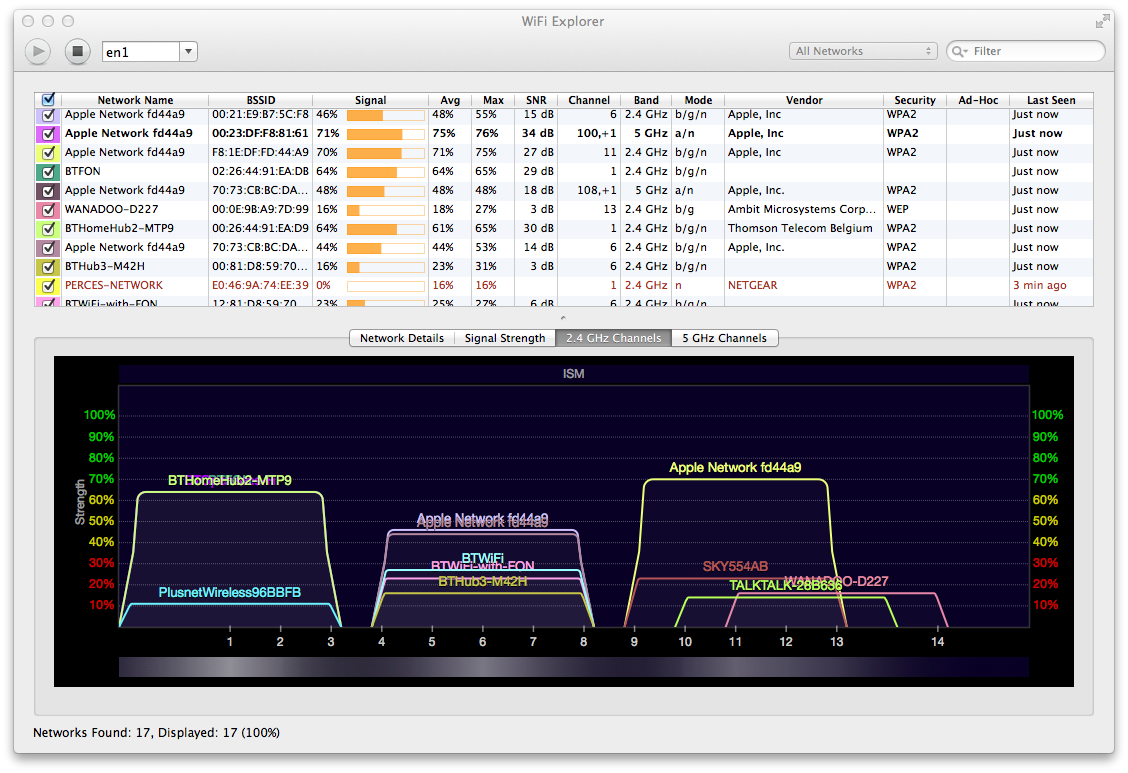
By way of an example, we live in a pretty average housing estate, it’s not very densely populated, consisting of single occupancy houses, but this is a snapshot of the 2.4Ghz band, the one used by the vast majority of wi-fi devices.

You can easily see the problem, even in this relatively low density housing area there are sixteen different networks fighting over the available bandwidth. Worse than that because of the way wi-fi works each router actually takes a chunk of bandwidth that overlaps multiple channels. It’s also interesting to note that aside from one or two they are all sitting on particular channels – either 1, 6 or 11.

But it doesn’t have to be like that.

Screen Shot 2013-08-17 at 12.47.43PMTake a look at this picture. You’ll see from the network list at the top that this is in the same place, but instead it’s showing the wi-fi units running on the alternative 5Ghz band. Here you’ll see that there are only three signals picked up, and they all have the same name – not surprising as it’s what I’m using to get around the congestion and hook up devices wirelessly. In an area where I can pick up a load of other people using Wi-Fi, there is only me using 5Ghz So if you’ve got wireless issues I’d always recommend trying the 5Ghz channels if you can as you’ll often find almost nobody else using them.

There are issues of course, not least that some devices only work on the 2.4Ghz band, so you can’t usually switch over totally – most of my Apple base stations are running in dual band mode which means alongside the 5Ghz signal they’re also giving a 2.4Ghz signal. But if you’re using wireless and your devices support 5Ghz, give it a try, and you may well find your wireless network will work a lot better…

How to Make Your Wi-Fi Really Useless

So tonight I’m off on a business trip, visiting a potential customer in the morning, and enjoying the delights of a hotel. Thankfully I managed to find an alternative to the Travelodge room that was originally proposed for me (at a site that someone on Trip Advisor reviewed as ‘Absolutely Awful’) at a Best Western in a village a few miles up the road, the Llyndir Hall Hotel. This place is only £5 a night more than the Travelodge, but Trip Advisor has a load of good reviews for this one – on paper it looks an absolute bargain – plus it has broadband internet in every room, either cabled or wi-fi.

So lets start off with what’s good. The location is lovely, a nice country house surrounded by fields. Incidentally, the postcode for the hotel in Google Maps – also used by the hotel itself sends you slightly off track – the actual location is just round the corner and clearly signed from the main road. All the staff are friendly, and it’s a nice big room with a decent bathroom and pretty quiet – I can’t hear the corporate party downstairs at all! The food in the restaurant is good too – certainly beats the Little Chef that is apparently the only option at the Travelodge.

The main annoyances are the TV setup, which like many hotels in the UK has a seemingly random selection of channels, some of which are showing Sky card errors – and the broadband internet access.

My room is one of the ones with wi-fi, whereas other parts of the hotel have ‘broadband modems’ – according to the guest directory both should have a login, but I didn’t see any of that when I connected.

The problem though is the restrictions. The key things I want to be able to access are my e-mail and the company network – neither of which I can get to. Trying to access any site using SSL produces this web page – basically the unable to access page for the hotel networking appliance they have installed. Since our e-mail is kept secured I can’t access it that way. The other option is to use the corporate VPN but like pretty well everything outside normal web pages, that is blocked too. As a result, aside from browsing round websites, I can’t actually access anything useful. Just to round it off really well, the wireless router is just far enough away that the signal keeps dropping off.

It’s not as if it isn’t possible to do it properly. Last year I stayed in a hotel in Chester that had network points in every room (a much more reliable connection than Wi-Fi) – and had no problems accessing either the VPN or e-mail, it’s just seems that here someone has decided to install networking, but without actually considering what people might want to use!

So if you want a nice well priced country getaway this place is great – just don’t bother if you’re on a trip where you need full internet access, indeed access to anything other than standard non-secure sites.

Just a little post-script, I have been able to get all my e-mail – thanks to the wonders of X-Series. All a bit compact on the small screen, but I found out what I needed to know.

Are You Going to Get an iPhone?

Much as expected, this mornings ‘surprise announcement’ from Apple revealed that in the UK the iPhone would be exclusively on O2 and available through the Carphone Warehouse.

In terms of pricing the handsets will sell for £269 and will not be subsidised. Users will have to sign up for an 18 month contract which will cost either £35, £45 or £55 a month. All the contracts will include unlimited data, plus free access to the 7500 wi-fi hotspots operated by The Cloud. Other important points to note are that this is the same iPhone as in the USA – so no 3G. The phone will operate on the older GPRS system, making use of EDGE where available – currently only about 30% of the country.

That is certainly going to make things interesting over how the phone will sell and who will buy it. The majority of phones in the UK are subsidised, so comparatively the iPhone is a big outlay. The free wi-fi is nice, but in comparison to the high speed connection I can get pretty well anywhere using my 3G phone it is a definite step back. Certainly a quick straw poll around here has found that the lack of 3G is a definite sticking point for the UK techie. However much the funky touch-screen attracts them, over here 3G is a big issue.

However, where it might sell is with the fashion concious who are only after a phone. Certainly the hype and the unique look may well find a lot of users going out just to have the latest and greatest phone. Even without 3G it is still perfectly able to make phone calls, and works fine as a music player – it’s just that I don’t think you’re going to find too many of the techies queuing up for it come November 9th. I’m sticking with my Nokia.

Freebie Wi-Fi ‘Grey Area’ Gets Cleared Up

An article published on Thursday confirmed that one of the big grey areas in the current explosion in computer communications had been cleared up, at least for the UK.

A user with a wi-fi laptop had found an unprotected wireless network at a domestic address in Ealing, and on three occasions had been spotted sat outside in his car using the connection. As a result the user had been prosecuted and convicted under the Communications Act, and was fined £500, given a 12 month conditional discharge, and had his laptop and wi-fi card confiscated.

Having said that, finding an unprotected wireless connection is not exactly difficult. Although our network at home is encrypted, hidden and controlled by an access list, our two wi-fi equiped computers can usually see two or three other networks which are totally unprotected. In fact when I was first setting up our wi-fi Beth’s laptop couldn’t initially locate our network and Windows automatically logged on to one of the other networks and started downloading!

As an example of the extent of the problem a friend once drove back from docklands to Finchampstead using his wirless laptop hooked up to a GPS to navigate. At the same time he had a copy of NetStubmler running which plotted in excess of 1500 unprotected networks over the 40 mile journey. Slightly worryingly whilst there were plenty in residential areas, the greatest density of unprotected wireless was in the city – from office blocks.

The grey area has come from the debate over access. People who have borrowed these connections are not physically trespassing, or gaining unauthorised access to buildings in any way, the argument being that because the signal is available in public areas it is free to use to the public. It is up to the owners to ensure that it is protected if they don’t want it used. What the court case has done is drawn the line at a different point. As a non-computer type analogy, it could be compared with a person who leaves their front door wide open, and you just pop in the door and make a quick call on their phone.